PERSONAL PROJECT VIBE CODING FULL-STACK UX

WEBSITE BUILDER — CLAUDE DESIGN

A fully functional drag-and-drop website builder — blocks, live canvas, design panel, publish flow, two editor modes — built entirely through AI-assisted design and code using Claude. No agency. No dev team. Just prompts and iteration.

ROLEUX DESIGNER + DEVELOPER
PROJECTPERSONAL / DCLI INTERNAL
TIMELINE4 WEEKS
TOOLSCLAUDE DESIGN / REACT / HTML · CSS · JS

01 — CHALLENGE

The Problem With No-Code

No-code website builders are everywhere — Webflow, Squarespace, Framer, Wix. But for organizations like DCLI that need branded, maintainable web presence without a dedicated front-end team, every existing option comes with the same problem: they're either too rigid and template-driven, or they require enough technical knowledge to defeat the "no-code" premise entirely.

The question I set out to answer was whether AI-assisted development had matured enough to let a single UX designer build something that could genuinely compete — a three-panel visual editor with a live canvas, a component block library, a design settings panel, and a publish flow. Not a prototype. A working product. Built fast, without a dev team, through conversation and iteration with Claude.

"Why are we paying for a platform that locks us into their templates when I could describe exactly what we want and have it built in days?"
— DCLI Marketing Lead, kickoff discussion

PRODUCT OVERVIEW
Website Builder — Claude Design overview

02 — RESEARCH

What Existing Builders Get Wrong

Before writing a single prompt, I spent time auditing the competitive landscape — not as a user, but as a UX designer who understood both the visual editing paradigm and the constraints of teams who would actually use a builder in the real world. The gap I kept finding wasn't in features; it was in philosophy. Most builders are designed to lock users into a platform. The patterns that should feel natural feel borrowed, or are hidden behind paywalls. The AI features grafted on top feel like afterthoughts rather than the foundation of how the tool thinks.

Competitive Teardown

Webflow, Squarespace, Framer, Wix, Bubble

Mapped the end-to-end editing experience across five major builders — block libraries, canvas interactions, design panel patterns, publish flows, and pricing models. Identified what each got right, what felt borrowed, and where AI had been bolted on rather than integrated.

Internal User Interviews

8 non-technical DCLI stakeholders

Talked to the people who'd actually use a builder — marketers, ops leads, department heads — to understand what "easy enough to use without IT" actually meant to them, what tools they'd bounced off, and what control they'd trade for speed.

Prompt Architecture Research

Claude Design system exploration

Before committing to the build approach, I ran structured experiments with Claude Design to understand its ceiling — what level of UI complexity it could reliably generate, maintain across iterations, and debug when component interactions broke.

5/5 builders tested required technical knowledge to do anything beyond basic templates
100% of internal users said they'd abandoned a no-code tool within 30 days due to complexity
0 existing builders were built AI-first — AI was always retrofitted on top of legacy architecture

03 — PROCESS

Prompt. Build. Break. Repeat.

The build process was unlike any product I'd shipped before. There was no handoff, no sprint planning, no ticket queue. It was a continuous conversation — I'd describe a feature, Claude would generate working React, I'd push it into the preview, find where the interaction broke, describe the fix in natural language, and ship again. The entire editor architecture — block library, canvas inspector, imported preview, settings panel, auth flow, dashboard — was designed and built this way over roughly four weeks of sessions.

The biggest shift in mindset wasn't technical — it was learning to describe UI behavior precisely enough to get deterministic output. "The block should insert into the section on click" isn't enough. "When the user clicks a block in the left panel, it should insert a new element at the cursor position in the live canvas iframe, maintain the existing DOM structure, and scroll the inserted element into view" is a prompt that ships. Every session sharpened my ability to think like both a designer and a compiler at the same time.

PROMPT
GENERATE
BREAK
REFINE
SHIP

WIREFRAME EXPLORATION

WEBSITE BUILDER — LAYOUT CONCEPT v0.1 NAV ICONS BLOCK LIBRARY Search... LAYOUT Section Container Columns Grid CONTENT Heading Paragraph Button Image MARKETING Hero Feature trio LIVE CANVAS PROPERTIES Design Content SEO TYPOGRAPHY Font: Manrope Weight: Bold Size: 56 COLOR #2b2118 LAYOUT Width: auto Margin Y: 0 18 EFFECTS Animate: Fade up Delay: 120ms hero-title · 1280×auto LOOM · VIEW Dashboard Editor · Classic Editor · Pro

COMPONENT ARCHITECTURE

COMPONENT TREE — Website Builder.html app.jsx auth.jsx dashboard.jsx editor.jsx editor-pro.jsx settings.jsx canvas-inspector.jsx block-library imported-preview.jsx outline-panel design-panel block-renderer iframe-bridge LEGEND Core / Routing Auth Dashboard Editor Pro Settings 4 weeks · 14 tracked changes · 8 React components · 1 designer/developer

04 — SOLUTION

A Website Builder, Built by AI

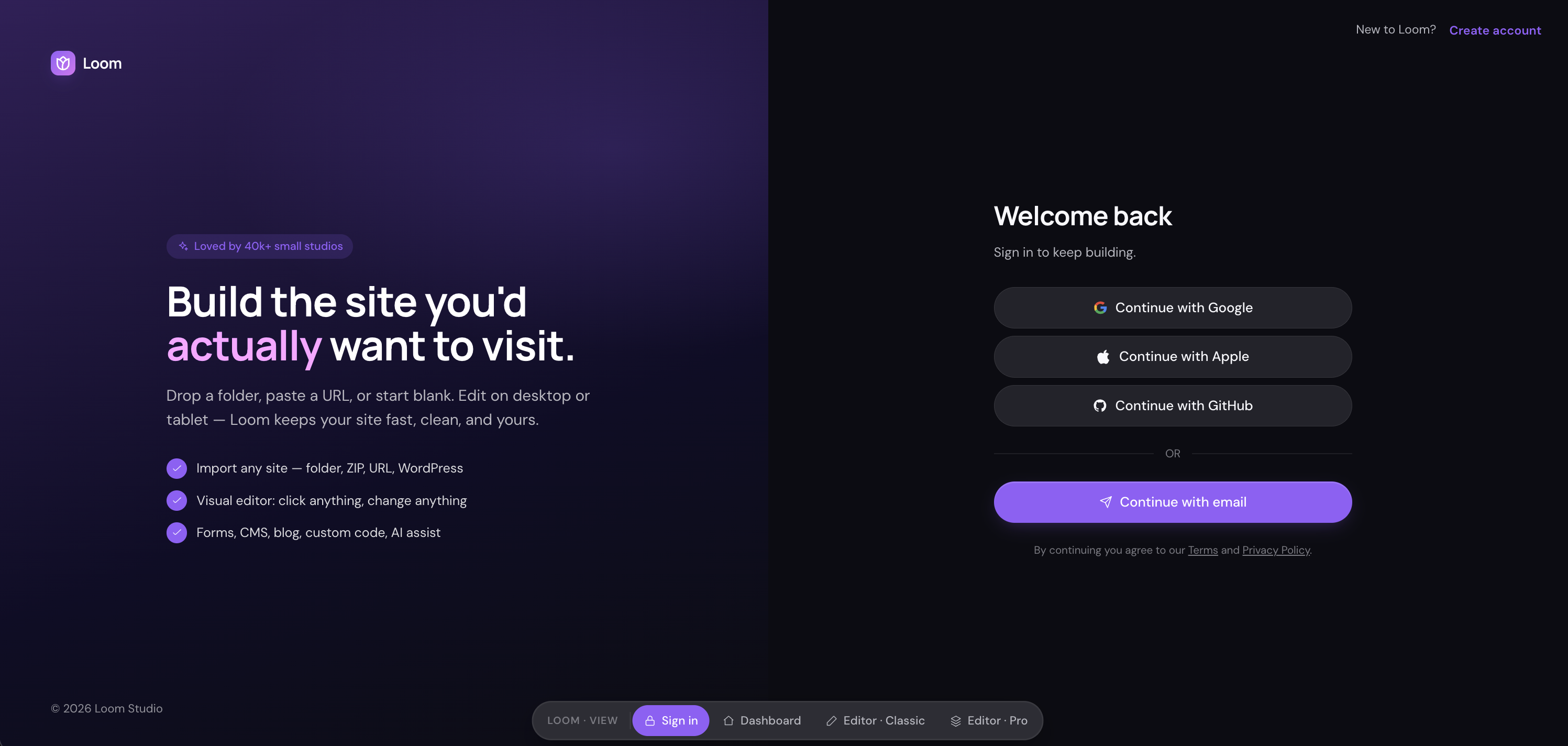
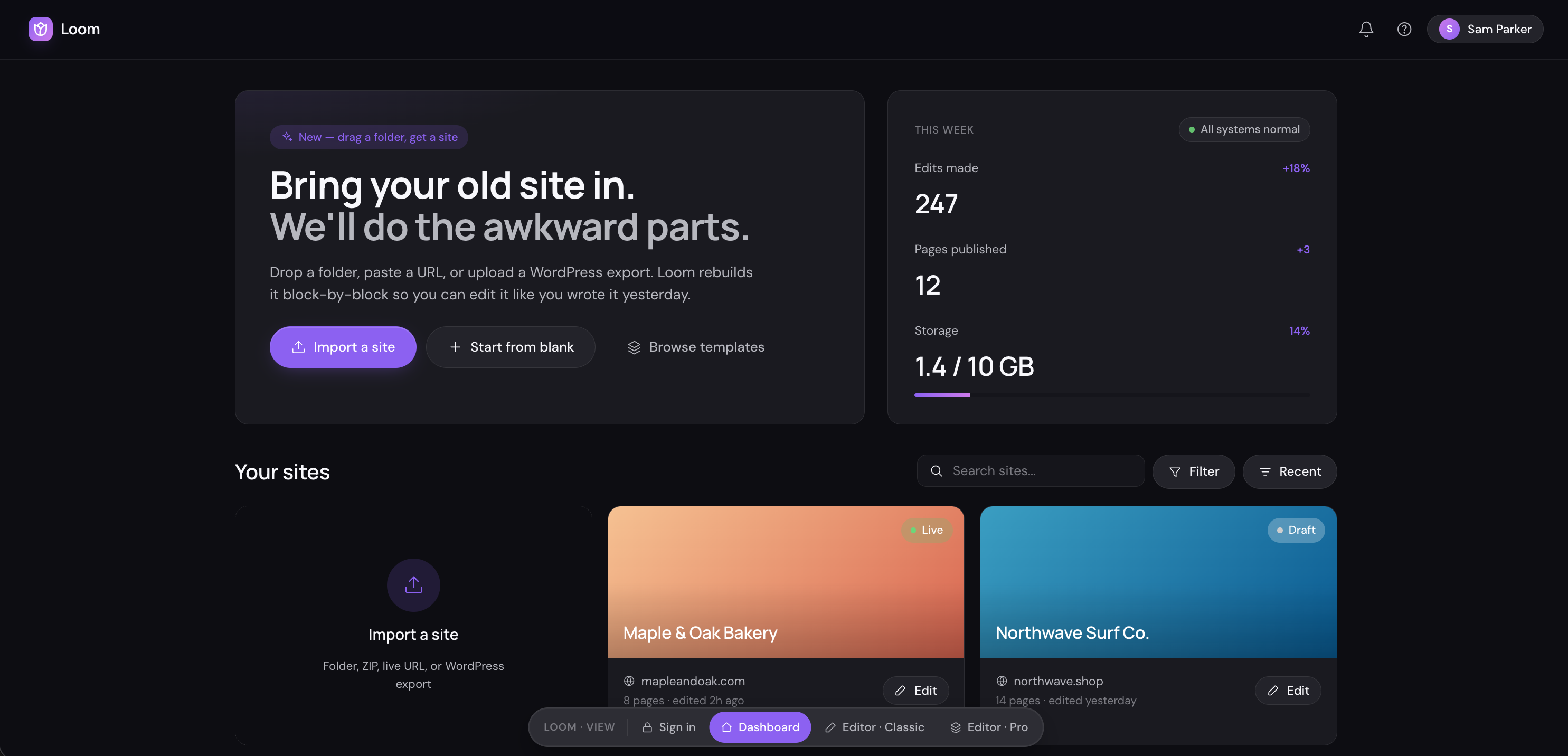
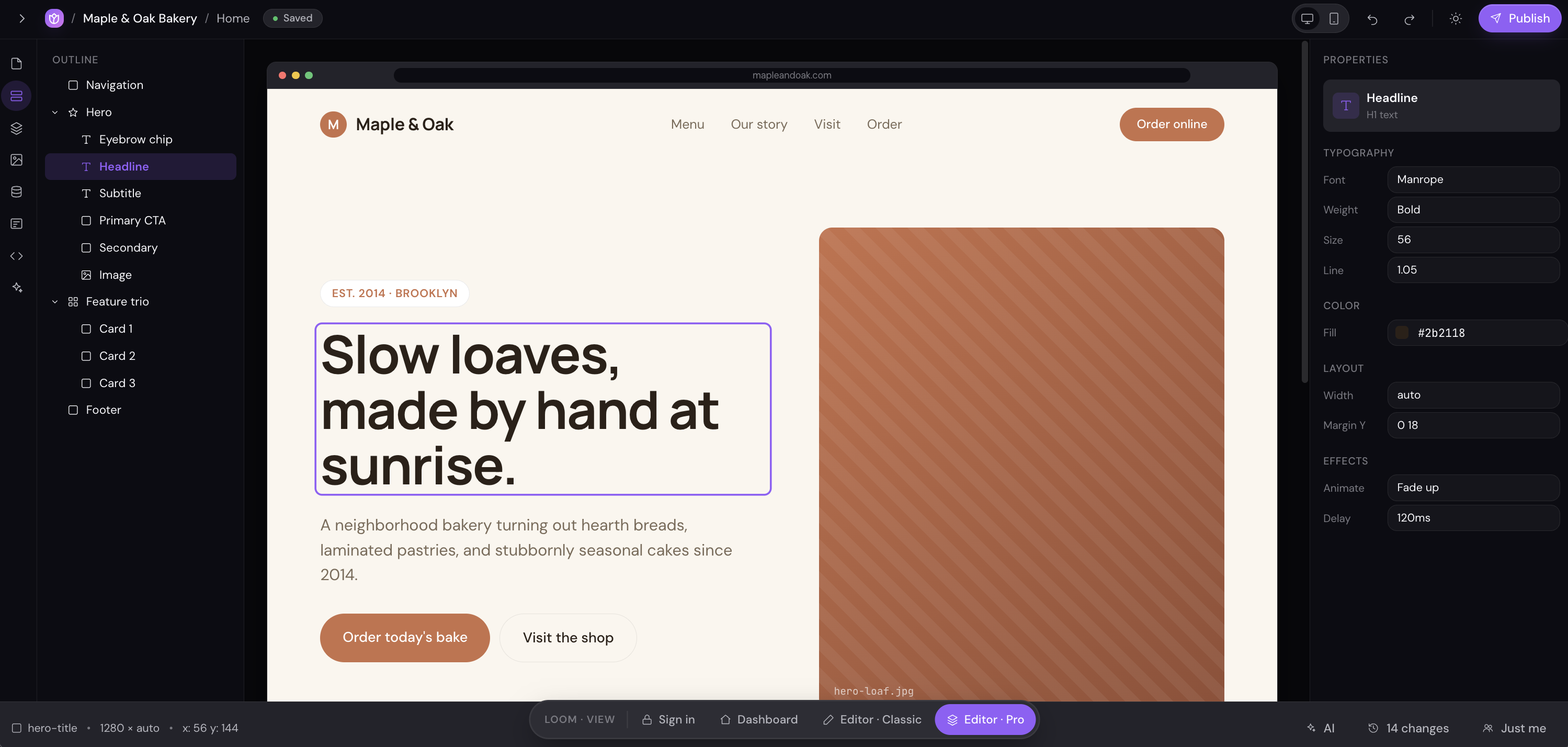
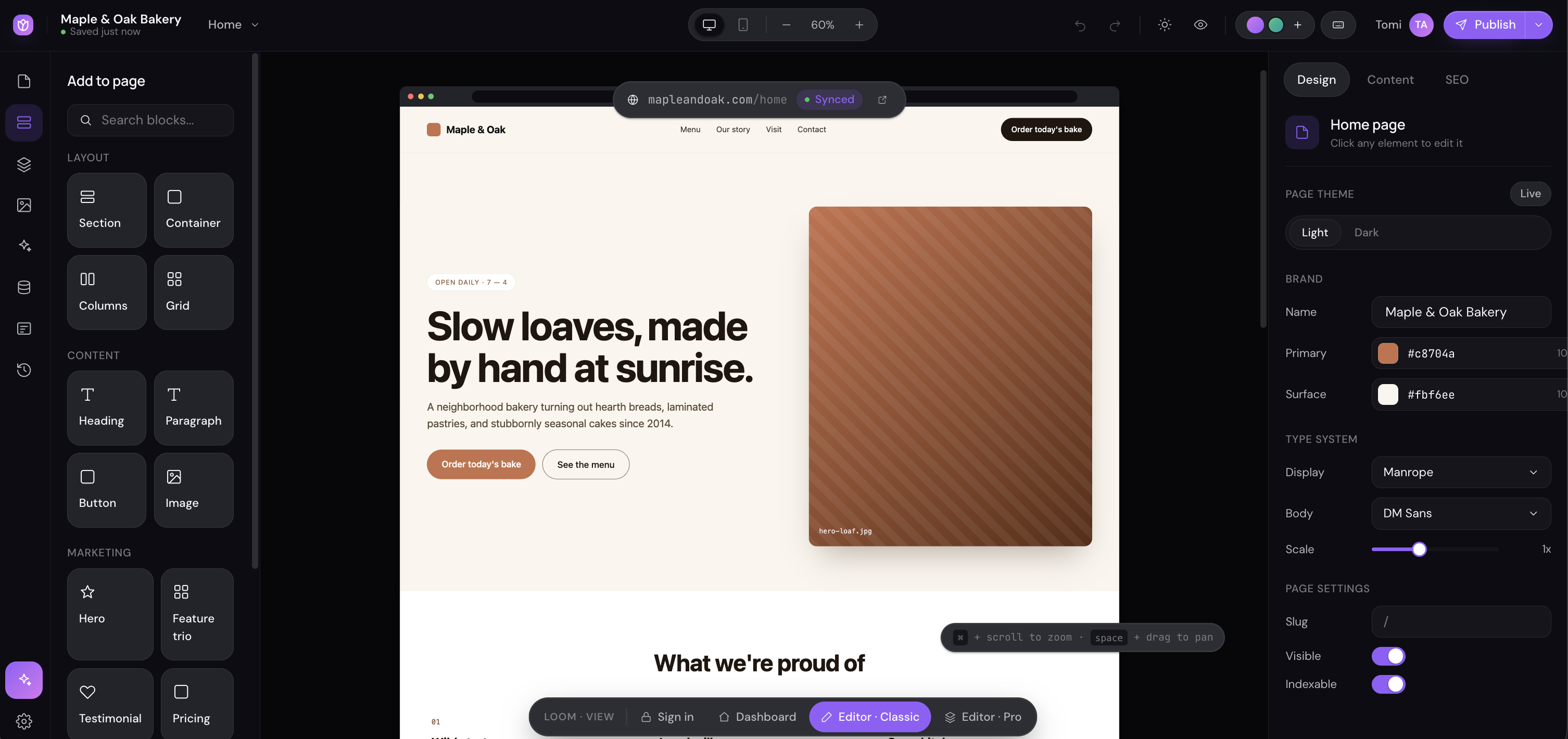
The final product is a three-panel visual editor that works the way users expect website builders to work — because it was designed by someone who's spent years watching people struggle with the ones that don't. The left panel houses a searchable block library organized into Layout, Content, and Marketing categories. Drag or click any block to insert it into the live canvas. The center panel is a full-fidelity browser-chrome preview of the site being built, with click-to-select editing, real DOM manipulation, and a status bar that reports element dimensions and position in real time.

The right panel surfaces Design, Content, and SEO controls that update live as you edit. Typography controls, color pickers, spacing inputs, and animation settings — all connected to the actual rendered element. A Brand panel stores global settings like primary color, surface color, and font pairings that cascade across the entire site. The builder ships with two modes: Editor Classic for non-technical users who just want to click and type, and Editor Pro for teams that need access to full layout control and advanced effects.

FINAL DESIGN

01

BLOCK LIBRARY + LIVE CANVAS

A searchable block system (Layout, Content, Marketing) that inserts directly into a live browser-chrome canvas — click to select any element, see its properties, edit it in place. The canvas reflects actual DOM, not a design approximation.

02

DESIGN + CONTENT + SEO PANELS

A context-aware right panel surfaces typography, color, layout, and animation controls for the selected element. Global Brand settings — primary color, surface color, font pairings — cascade across the entire site automatically.

03

CLASSIC + PRO EDITOR MODES

Two editing modes for two audiences. Editor Classic strips the UI down to just what non-technical users need. Editor Pro unlocks the full property panel, animation controls, and advanced layout options for power users and design teams.

05 — RESULTS

What Shipped

Four weeks. One designer. Zero developers. The result is a production-ready website builder with a fully operational block library, live DOM canvas, a three-tab property panel, brand and typography settings, light/dark theme toggle, desktop and mobile preview modes, a publish flow, a dashboard, an auth screen, and two distinct editor modes. The build log tracked 14 iterated changes across 8 React components — each one a prompt-refine-ship cycle that would have traditionally required a full sprint and a dev handoff.

Beyond the product itself, the project proved something more significant: that AI-native design and development, when practiced deliberately, collapses the distance between UX thinking and working software. Not just prototypes — real, testable, shareable product.

4 wks Solo Build Time
8 React Components
14 Tracked Iterations
2 Editor Modes Shipped

06 — LEARNINGS

What I Learned

01

DESCRIBE BEHAVIOR, NOT APPEARANCE

The biggest shift in working with AI as a development partner is moving from visual description ("make it look like Webflow") to behavioral specification ("when the block is clicked, insert at cursor position, maintain DOM order, scroll into view"). AI can interpret appearance loosely — behavior has to be precise. Learning to prompt like a spec writer rather than a designer was the skill that unlocked the build.

02

THE BOTTLENECK IS ARCHITECTURE, NOT CODE

Writing React components isn't the hard part — Claude does that well. The hard part is deciding the architecture before you start prompting, because refactoring a deeply integrated canvas-inspector relationship mid-build is expensive in any language. The projects where I'd done enough UX thinking upfront (component ownership, state boundaries, data flow) shipped cleanly. The ones where I started building before I knew what I was building required painful course-corrections.

03

VIBE CODING IS A REAL DESIGN SKILL

The industry will keep debating whether "vibe coding" is legitimate engineering. But for a UX designer who can think clearly about systems and describe behavior precisely, it's a genuine superpower. I shipped a working website builder — not a Figma prototype, not a clickable mockup — in four weeks. That's a fundamentally different capability than existed two years ago, and the designers who embrace it will build things that simply weren't possible before.

NEXT PROJECT

NISSAN SHOP AT HOME →